Is Technology the Future of Workplace Design?
By Arena Consultants · December 26, 2024 · 7 min read
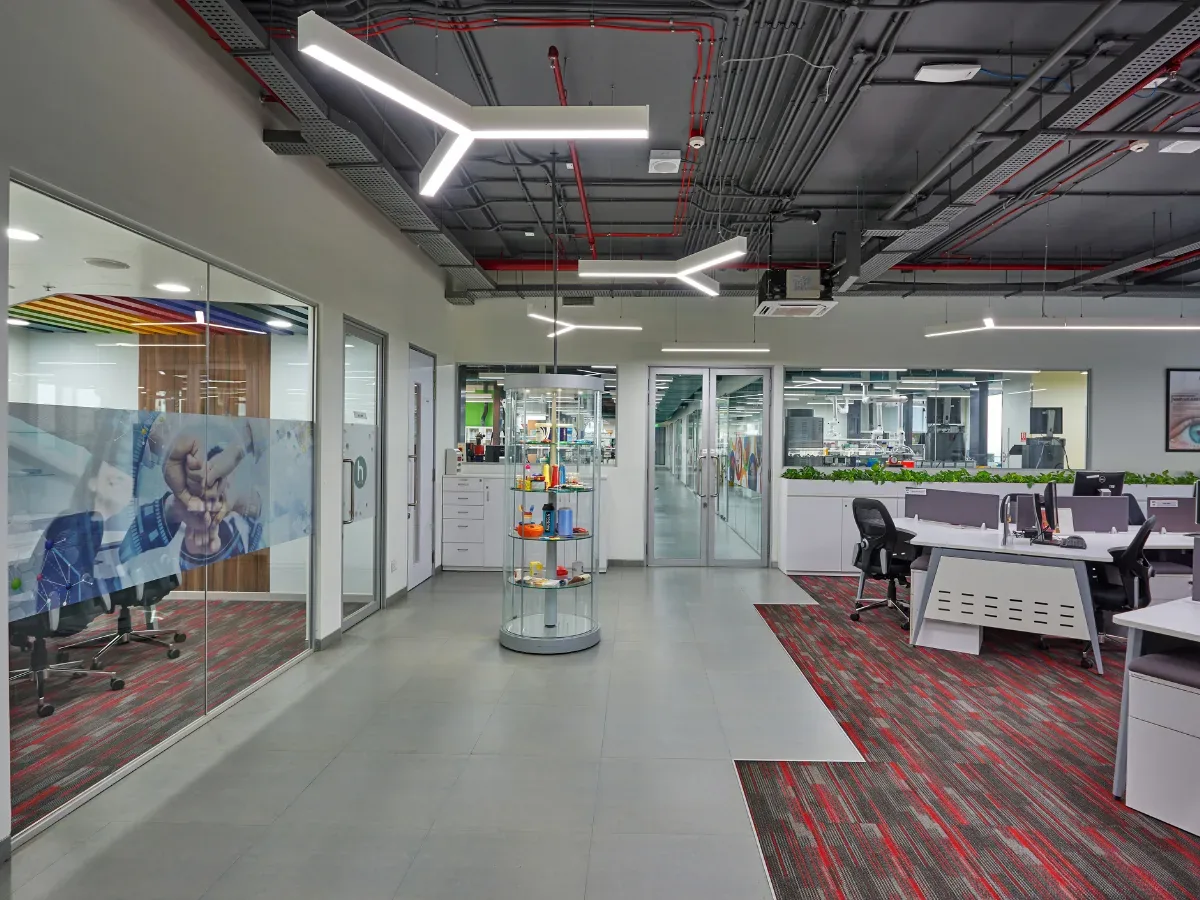
For decades, office design followed a simple formula: count the employees, give each one a desk, add some meeting rooms and switch the lights and air conditioning on at nine. It worked because everyone came in at the same time and did roughly the same kind of work.
That formula no longer holds. Hybrid work means attendance rises and falls through the week. Teams come in to collaborate, not to sit at a desk they could have at home. And the same building can be overcrowded on Wednesday and half empty on Friday.
Technology is how workplaces are adapting. Not by adding screens to every wall, but by giving organisations the data to design for how people really work, and the systems to let the building respond in real time.
Why the workplace has to change
The numbers tell the story. According to benchmarking from CBRE and JLL, global office utilisation averaged around 53% to 56% in 2025, up sharply from 35% to 38% in 2023 and 2024. That is a real recovery, but it still means close to half of the average office sits unused on a typical day.
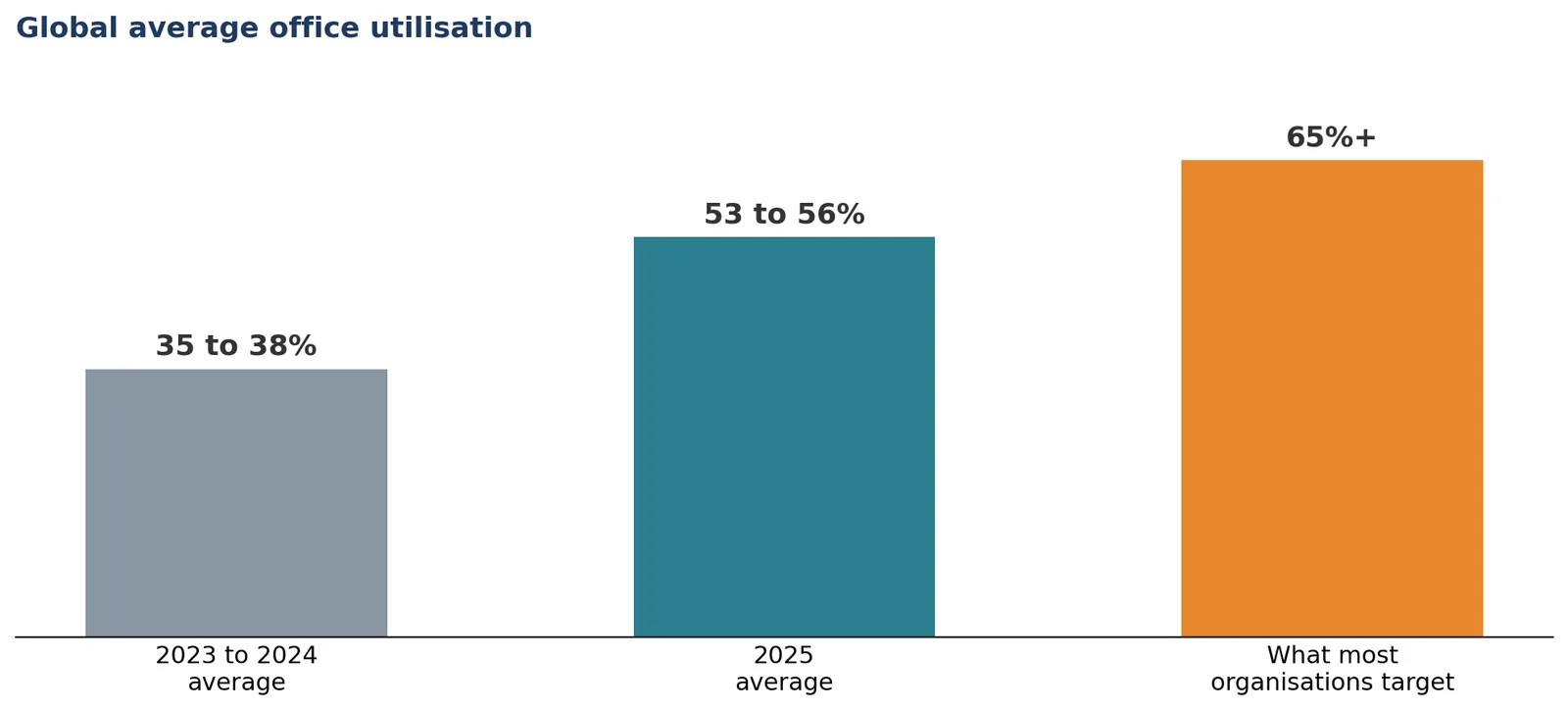
Averages also hide the swings. CBRE data shows most organisations hitting near capacity on peak days, while two thirds report utilisation below 60% on an ordinary day. Meanwhile, 79% of organisations say they aim for utilisation of 65% or more.
An office designed for average attendance is too small on Wednesdays and too big on Fridays. Technology is what lets a workplace handle both.
Sound familiar?
- Midweek, people cannot find a meeting room. On Friday, whole floors are empty but fully lit and air conditioned.
- Large meeting rooms are booked for one-person calls.
- Remote colleagues struggle to see or hear in hybrid meetings.
Nobody can say with confidence how much space the business actually needs.
Six ways technology is shaping workplace design
1. Design from data, not assumptions
The most valuable workplace technology is often the least visible: occupancy sensors, badge data and booking systems that show how space is really used. Which rooms are always full? Which zones sit empty? How many people actually come in on each day of the week?
This data changes the design brief. Instead of planning for headcount, designers can plan for real patterns of use, sizing the mix of desks, meeting rooms, focus spaces and collaboration areas to match how people work. It is also the best protection against cutting space that teams genuinely need.
2. Plan for hybrid, activity-based working
If people come to the office to collaborate, the office should be designed for it. Activity-based workplaces replace rows of identical desks with a range of settings, each suited to a different kind of work:
| Zone | Designed for | Technology that supports it |
|---|---|---|
| Focus areas | Concentrated individual work | Bookable desks, good acoustics, task lighting |
| Collaboration spaces | Team workshops and project work | Large displays, wireless screen sharing, writable walls |
| Hybrid meeting rooms | Meetings with remote participants | Room cameras, ceiling microphones, speaker tracking |
| Quiet rooms and phone booths | Calls and private conversations | Booking panels, acoustic treatment |
| Social and breakout areas | Informal connection | Flexible power and data, casual seating |
Hybrid meeting rooms deserve particular attention. When remote colleagues cannot see the whiteboard or hear the person at the end of the table, they disengage. Room design, acoustics and camera placement matter as much as the equipment itself.
3. Make the building respond to who is in it
Most offices still run on fixed schedules: lights, heating and cooling switch on and off at set times, whether or not anyone is there. Smart building systems connect sensors to a building management system (BMS) so the office responds to actual occupancy instead.
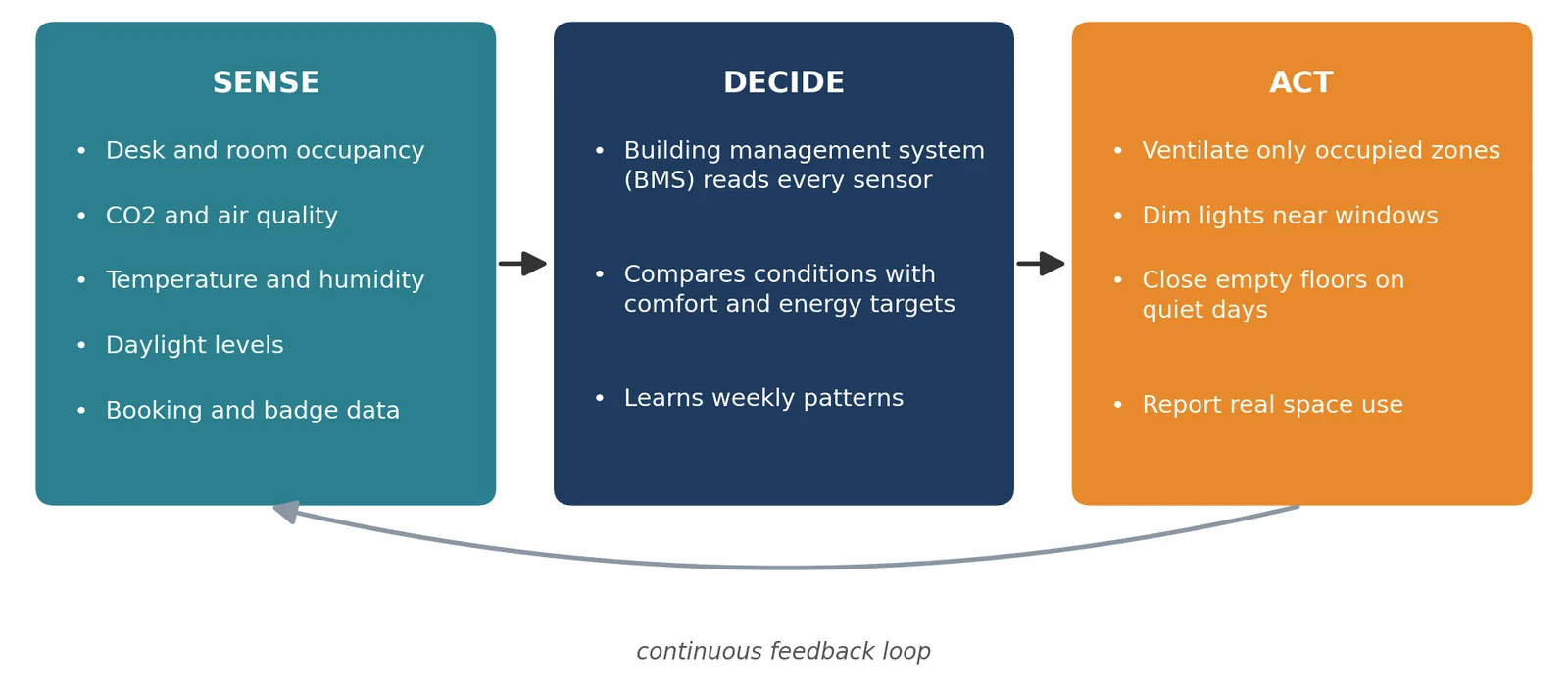
Heating, ventilation and air conditioning account for around 30% of the energy used in commercial buildings, so matching it to real occupancy is one of the most effective ways to cut running costs and emissions. On quiet days, entire floors can be closed and their systems turned down.
4. Put health and wellbeing at the centre
Technology can make offices healthier, not just more efficient. Air quality is the clearest example. A Harvard study of office workers (the COGfx study) found that cognitive function scores were 61% higher in well-ventilated, low-pollutant "green" conditions, and 101% higher when ventilation was enhanced further, compared with conventional office conditions.
Other tools support wellbeing too: CO2 and air quality sensors that trigger fresh air when rooms get stuffy, lighting that follows natural daylight patterns, sit-stand desks, and acoustic design that keeps open areas from becoming noisy and draining.
5. Secure the workplace without slowing it down
Access control has moved on from the plastic badge. Mobile credentials, smart cards and biometric systems can secure entrances, restricted areas and storage while giving people frictionless access to the spaces they need. The same data feeds occupancy reporting.
Where biometric or personal data is collected, it must be handled in line with India's Digital Personal Data Protection Act, 2023, so involve your IT and legal teams early in the design.
6. Let AI handle the patterns
Artificial intelligence is starting to make workplace systems smarter. AI tools can learn weekly attendance patterns, predict busy days, pre-condition spaces before people arrive and suggest how to reallocate underused areas. At the design stage, AI-assisted tools can generate and compare layout options and model energy use faster than traditional methods.
The key word is "assist." AI is good at spotting patterns in data. Deciding what kind of workplace an organisation wants still requires people.
When the workplace includes a laboratory
For science-led organisations, the workplace is not just an office. Researchers move between the lab bench, write-up areas, meeting rooms and the wider office through the day. Technology has to work across all of these spaces: booking systems that cover lab equipment as well as meeting rooms, monitoring that tracks both office comfort and lab safety, and layouts that keep write-up areas close to the labs they serve.
This is where workplace design and laboratory design meet, and where getting the connections right makes the biggest difference to how productive a research team can be.
Where workplace technology goes wrong
More technology is not automatically better. Common pitfalls include:
- Buying tools before defining problems. A booking app does not fix a shortage of the right kind of space.
- Systems that do not talk to each other. Separate apps for desks, rooms, access and energy create more work, not less.
- Technology people avoid. If a meeting room system takes five minutes to start a call, people will take calls at their desks instead.
- Forgetting the long term. Sensors, software and AV equipment need maintenance, updates and eventually replacement. Budget for the full life of the system.
Try this: Before adding any new workplace technology, collect two to four weeks of occupancy or booking data. Let the data tell you what problem to solve first.
Questions to ask before you redesign your workplace
Ask this: how do our people actually use the office today? Not how they used it in 2019, and not how the floor plan assumes. Real occupancy data is the foundation of every good decision that follows.
Ask this: what do people come in to do? Collaborate, focus, meet clients, socialise? The answer decides the mix of spaces, and the technology each one needs.
Ask this: will our systems share one view of the building? Occupancy, booking, access and energy data are far more useful together than in separate silos.
So, is technology the future of workplace design?
Yes. The shift to hybrid work has made the traditional, fixed office model obsolete, and technology is what allows workplaces to become flexible, efficient and responsive. Occupancy data shows how space is really used, smart systems cut energy waste, and hybrid-ready rooms keep teams connected wherever they sit.
But the technology is only as good as the design behind it. The best workplaces start with a clear understanding of how people work, choose technology that serves those needs, and plan every system to work together from day one. Technology shapes the future of the workplace. Thoughtful design decides whether that future works for the people in it.